
Hairstyle Try On - AI Haircut
JYCoderBeauty
4.41.57K Reviews
- Version
- 411.0.0
- Installs
- 1.00M
- Age Rating
- Everyone
Screenshots
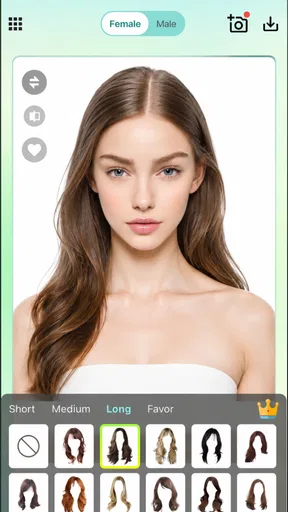
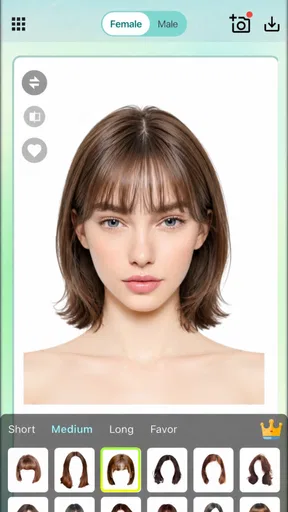
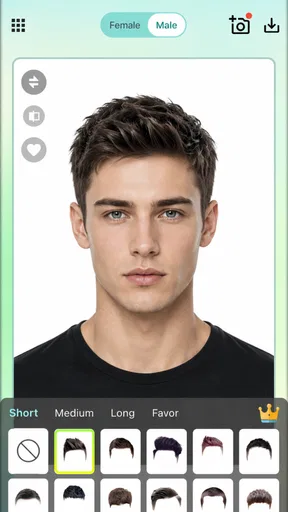
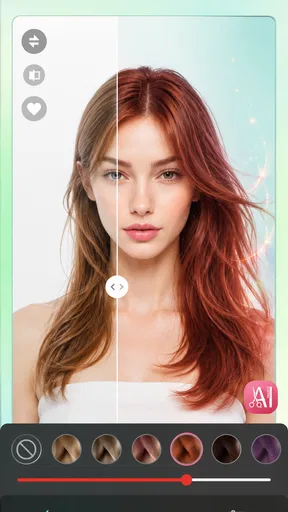
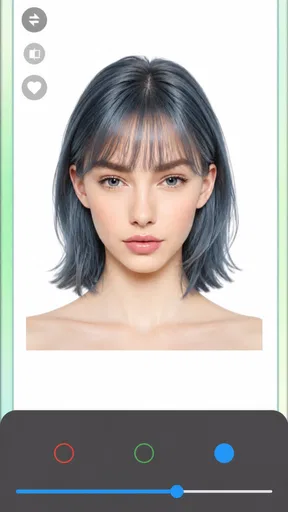
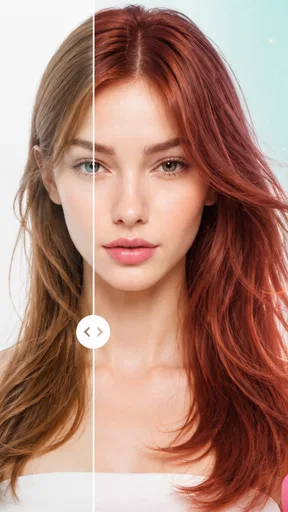
Our Review of Hairstyle Try On - AI Haircut
 Analysis by Appyee
I find hairstyle decisions easier when I can compare a few ideas before making a salon appointment, rather than trying to imagine a cut from a reference photo alone. That is the appeal of Hairstyle Try On-600+ Haircuts: it lets me explore a change on a photo of myself, which can turn a vague “maybe shorter” into something more concrete. I’d treat the results as a way to start a conversation, not as a promise of exactly how a real cut or color will look.
A quick preview, not a salon consultation
The basic idea is appealingly direct: choose a photo or take one, then try different looks against it. For a first pass, that should be less work than building a mood board from separate pictures or scrolling through examples of people whose hair and face may be quite different from yours. The app is in the beauty category, is free to download, and is developed by JYCoder. It has a 4.2 average from around 128,000 ratings, which suggests many people find the concept useful, though ratings alone cannot tell you how well a particular style will fit your photo.
Speed is part of the experience I’d expect from a photo-based makeover: the useful test is whether I can move from one possibility to another without turning a quick browse into a project. I’d start with a clear, front-facing image and compare a small set of noticeably different cuts before fine-tuning colors. That order makes it easier to judge shape first, rather than letting a dramatic shade distract me from whether the length or silhouette actually suits the look I want.
When the preview gets demanding
Trying one look is a light task; comparing many combinations is where the session can become more demanding. A practical approach is to save a few contenders and pause to compare them side by side, instead of repeatedly changing several details at once. If a preview looks misaligned, I’d retake or choose a better-lit photo before blaming the style itself. Hair edges can be difficult for any image tool to interpret when the background is busy, strands blend into clothing, or the face is turned away from the camera.
That makes the app most useful during a real decision point: perhaps I have a salon visit coming up and want to compare a long layered shape with a shorter option before asking for a consultation. I can keep the experiment low-pressure, using a natural color first and a bolder shade only after I know the cut is interesting. The preview can help me explain what I like—such as the length around the face—even if I decide the exact digital result is not realistic for my hair.
Stability, expectations, and the device
I would judge reliability by consistency across several photos, not by one convincing result. A hairstyle overlay may look plausible in one image and less natural in another because lighting, angle, and hair already in the photo affect the visual match. If a result seems off, changing the source image is a sensible recovery step; it is also a reminder that this is a visual guide rather than a professional assessment of texture, density, maintenance, or what a stylist can achieve.
The app is rated for Everyone, and its current version is 205.0.0, with Android 6.0 listed as the minimum operating system. It has more than a million installs. Those details make it easy to see why the idea reaches beyond people already committed to a dramatic makeover: a casual user can use it to explore, while someone planning a substantial change can bring a shortlist to a salon. It is free to download, with in-app purchases listed from $9.99 to $39.99 per item, so I’d check the purchase prompt carefully before choosing anything paid.
Exploring the App Features
The first thing that struck me about Hairstyle Try On-600+ Haircuts is its sheer variety. With 600+ styles, ranging from the classic bob to edgy pixie cuts, it’s like having a virtual salon in your pocket. The app boasts a user-friendly interface, making it easy to navigate through different styles and colors.
Upon opening the app, you’re prompted to either upload a photo or take a new one. This is where the magic happens. The AI technology detects your face shape and aligns the hairstyles accordingly. It’s surprisingly accurate, ensuring that every style fits snugly around your features. The color palette is extensive, letting you experiment with everything from natural blondes and brunettes to vibrant blues and pinks.
Personalizing Your Look
One of the standout features for me was the ability to customize each style. Not only can you change the color, but you can also adjust the length and volume. It’s perfect for those indecisive moments when you’re torn between going longer or sticking with a short cut. The app even offers styling tips based on your chosen look, giving you ideas on how to enhance the style with accessories or makeup.
There’s also a handy favorites section where you can store all the hairstyles you love. This is great for when you’re planning a trip to the salon and need to show your hairstylist a visual reference. No more trying to describe what you want; you can just show them the app!
Using previews to make a better shortlist
For a more useful salon reference, I’d avoid saving a dozen versions that differ only in tiny ways. Instead, I’d keep a small shortlist that shows distinct choices: one conservative option, one meaningful change, and perhaps one look I’m curious about but unsure I could maintain. That gives a stylist something to react to and leaves room for practical advice about whether the cut works with my hair’s natural behavior. A screen preview cannot tell me how much styling time a fringe will take each morning, or how a shape will sit after washing.
I’d also use the color controls as a conversation aid rather than a color prescription. A digitally appealing shade may need a different process on real hair, and the app cannot substitute for discussing current color, condition, or upkeep with a professional. The most valuable takeaway may be identifying a direction—warmer, lighter, more dramatic—rather than insisting on an exact match. That distinction can prevent an exciting experiment from becoming an unrealistic request.
The Social Connection
For those who love sharing their style adventures, the app allows you to post your new looks directly to social media. Whether it’s Instagram, Facebook, or Snapchat, you can instantly get feedback from friends and followers. The app encourages community interaction, so you can see what styles are trending and even follow other users for inspiration.
What’s cool is that the app also includes a section for user-generated content. You can see real-life transformations and get a sense of what different styles look like on a variety of face shapes and hair textures. It adds a layer of authenticity, showing that these styles aren’t just for models; they’re for everyone.
How it compares with other ways to choose a style
Compared with browsing ordinary haircut photos, a personal preview can make it easier to judge the overall outline against my own face. On the other hand, a stylist’s portfolio or an in-person consultation is better for understanding movement, texture, and the work needed to maintain a cut. Those options show real hair in real conditions, while a virtual try-on is strongest as an idea generator. I’d use them together: explore here, then bring a couple of references and ask a professional what would translate well.
It is also a different kind of tool from a full photo editor. If my goal is simply to make a polished portrait, editing software may offer more control over the whole image. If I want to answer a narrower question—“Would I like seeing myself with a shorter shape?”—a dedicated hairstyle app is more focused. The trade-off is that a focused preview still depends on the source image and should not be mistaken for a realistic guarantee.
Who will get the most from it
I think this is especially handy for someone who is curious but hesitant: a person considering a bob, a shorter cut, or a noticeable color shift who wants to narrow the options before committing. It can also help when words are failing. Showing a visual example is often easier than describing “a little shorter around the sides” or “less weight at the ends,” even if the reference needs adapting for the person’s actual hair.
For an everyday scenario, imagine that I’m deciding whether to cut several inches before an upcoming salon visit. I’d take a clear photo in even light, test a few lengths without changing color, and save the two shapes that feel most like me. Then I’d show those options to the stylist and ask what would suit my hair and routine. That workflow keeps the app’s role realistic: it helps me arrive with a clearer preference, while the stylist handles the technical judgment.
I’d skip it if I wanted a precise preview of how a complex color treatment would develop, or if I expected the image to predict styling effort and upkeep. It is also less helpful if I only want professional advice about hair health or a cut tailored to a specific texture. In those cases, a consultation and real examples from a stylist are the better starting point.
Small habits that make the results more useful
Photo choice is the quiet make-or-break step. I’d use a recent picture with my face unobstructed, hair visible, and lighting that does not cast a strong shadow. A plain background can make the outline easier to assess. If the first fit looks strange, I would try another picture before deciding that the hairstyle itself is wrong; a different angle or a busy background can change how convincing an overlay appears.
Another useful habit is to separate shape decisions from color play. First compare lengths and silhouettes using shades close to your current hair, then explore color on the strongest candidates. This reduces the chance that a vivid novelty shade wins attention even though the cut is not what you actually want. I’d also keep the original photo in mind while judging the result: a preview is a mock-up layered onto a photograph, not a measurement of how hair will fall in motion.
Wrapping It Up
In a world where your hairstyle can say a lot about you, Hairstyle Try On-600+ Haircuts is a game-changer. It takes the guesswork out of choosing a new look and provides a fun, interactive way to explore different hairstyles. The app is easy to use, with plenty of features to keep you engaged. Whether you’re planning a major hair transformation or just looking for a change, this app is definitely worth a try.
So, why not download it and give it a whirl? You never know; your perfect hairstyle might be just a click away!
My practical verdict
I’d recommend it as a low-stakes way to explore possibilities, especially when I need a visual starting point rather than another folder of inspiration photos. Its range of cuts and the ability to adjust a look make experimentation more personal, while the favorites feature can turn casual browsing into a useful salon shortlist. The social side may suit people who enjoy getting reactions, though I would treat those opinions as taste, not expert advice.
My main caution is to keep expectations grounded. A convincing preview can be helpful, but it cannot promise a precise result on real hair, and repeating lots of edits may be less useful than comparing a few clear options. The app is free to try, but paid in-app items are part of the picture, so I’d pay attention to what is included before making a purchase. For a quick style brainstorm it earns a place on my phone; for decisions involving technical color work, hair condition, or maintenance, I’d take the shortlist to a stylist and let their experience guide the final call.
Privacy and Permissions
See what permissions an app requests and how it handles your data.
- Photos/Media/Files
- read the contents of your USB storage, modify or delete the contents of your USB storage
- Storage
- read the contents of your USB storage, modify or delete the contents of your USB storage
- Camera
- take pictures and videos
- Wi-Fi connection information
- view Wi-Fi connections
- Other
- view network connections, full network access, control vibration, prevent device from sleeping, Google Play license check
Verdict
Strengths of Hairstyle Try On - AI Haircut
- Extensive variety of hairstyles to try out.
- Easy to use interface for quick styling.
- Realistic hair color options available.
- Allows saving and sharing your looks.
- Offline mode for styling without internet.
Limitations of Hairstyle Try On - AI Haircut
- Limited options without in-app purchases.
- May not accurately reflect real-life results.
- Occasional app crashes reported by users.
- Requires a good quality selfie for best results.
- Some features are locked behind ads.
Similar Picks in This Category
View All
Beauty Makeup Editor & Camera
Photo & Video Editors - Instant Solution4.7

Perfect365: Face Makeup Editor
Perfect365, Inc.3.5

Mirror Plus - HD Mirror app
Digitalchemy, LLC4.8

Cute Lock Screen & Wallpapers
Prometheus Interactive LLC4.6

HD Camera for Android
One Music Player4.5

Phone Mirror app - True Mirror
Cards4.6
Frequently Asked Questions
What is Hairstyle Try On-600+ Haircuts?
Hairstyle Try On-600+ Haircuts is an app that allows users to experiment with over 600 different hairstyles and haircuts virtually. Using your phone's camera, the app overlays these styles onto your image, helping you visualize how different haircuts might look on you before making any real changes.
Is Hairstyle Try On-600+ Haircuts free to use?
The app offers a free version with a selection of hairstyles to try. However, for access to the full range of over 600 styles and additional features like advanced editing tools, users may need to make in-app purchases or subscribe to a premium version.
How accurate are the hairstyle simulations?
The accuracy of the hairstyle simulations depends on the quality of your device's camera and lighting conditions. Generally, the app provides a realistic preview, allowing users to adjust the position and size of the hairstyles for a better fit. However, results may vary based on individual features.
Can I save and share my hairstyle try-ons?
Yes, the app allows you to save your favorite hairstyle try-ons to your device's gallery. Additionally, you can share your new looks directly from the app to social media platforms like Instagram and Facebook, or send them via email or messaging apps to get feedback from friends.
What devices are compatible with Hairstyle Try On-600+ Haircuts?
Hairstyle Try On-600+ Haircuts is available for both Android and iOS devices. Ensure your device runs on a compatible operating system version; typically, Android 5.0 and up, or iOS 11.0 and later, to ensure optimal performance and access to all features.
